




The High Level section of DMIS is the part of the language that most closely resembles other computer languages. It includes statements that allow the programmer to declare and use variables, perform calculations, control program flow, etc.
This section of the DMIS language differs from the rest in that it isn’t specific to the measurement process. It does however provide tools to control and manipulate the measurement process.
Variables:
If you have used other programming languages you will be familiar with variables. If you haven’t then you can think of a variable as a slot in the computer memory that you name and insert values into. The values can then be altered (that’s why it’s called a variable, get it?) or retrieved for use in the program. DMIS provides a number of variable types which correspond to the type of data you will store in them:
BOOL= true or false.
DOUBLE= decimal number (more decimal places).
REAL= decimal number (less decimal places).
INTGR= whole number (small number).
LONG= decimal number (large number).
CHAR= text.
For instance, if you wanted to store a persons name you would use aCHARvariable. If you wanted to store a result you would use either aDOUBLEor aREAL. In most circumstances it doesn’t matter which you choose but it is a good idea to use theDOUBLEtype for complex calculations requiring many decimal places. The same goes forINTGRorLONG. If you had a loop (more on loops later) that counts to ten then you obviously don’t need to use a LONG but if the loop counts to 1,000,000 you may have a problem withINTGRbecause on most 32 bit systems anINTGRcan only hold a value of approximately 32,000 although this is machine dependant, if in doubt useDOUBLEandLONG.
TheBOOLtype is a little different from the other variable types because it can only hold two values, true or false. It is most often used for making decisions based on these conditions.
Once you have decided on the type of variable you must use the DECL statement to declare it so that the system can allocate a slot in memory:
DECL/LOCAL, INTGR, numberOfRuns
This example creates a whole number(INTGR)variable callednumberOfRunswhich will beLOCALin scope. Scope dictates what part of the system has access to the variable:
COMMON= system wide access.
GLOBAL= access by main and sub programs.
LOCAL= access only by main program.
Good programming practice dictates that you do not make variables available to other programs and processes unless necessary so the use of theLOCALtype is recommended for most cases.
DECL/LOCAL, CHAR, 512, operatorName
This example creates a text variable(CHAR)called operatorName which will beLOCALin scope. When it comes to text variables the system does not have any idea how much space to allocate so we have to specify the maximum number of characters using an optional numeric parameter, in this case 512 characters.
DECL/GLOBAL, REAL, xValue
This example creates a decimal number(REAL)variable calledxValuewhich will beGLOBALin scope.
Assignments:
Now that you have created a slot in the computer memory you need to a place a value into it. One way to do this is with the ASSIGN statement:
userName= ASSIGN/Steve
In this example I have put my name into a variable calleduserName.
TheASSIGNstatement can also be used with expressions. Expressions are a combination of conditions, functions or calculations that will return a value which will be assigned to the variable:
myCos= ASSIGN/COS(DTOR(45))
In this example I am putting the cosine of 45 degrees into a variable called myCos. I have used two of DMIS’ intrinsic functions in the expression. The inner expression converts 45 degrees decimal to radians and the outer function returns the cosine of that result. The expression contains two DMIS functions COS (returns the cosine of an angle in radians) and DTOR (returns the radian equivalent of a decimal angle). Notice that one function is contained within the other, this is called nesting and the inner function will be executed first.
firstName= ASSIGN/Steve
lastName= ASSIGN/Horsfall
fullName= ASSIGN/CONCAT(firstName, , lastName)
This example assigns two variables called firstName and lastName as text and then combines the two variables split by a space constant using theCONCATstatement. The result of the concatenation is assigned to the fullName variable.
Getting data:
Another way of putting a value into a variable is to use theOBTAINstatement. TheOBTAINstatement gets data from DMIS elements such as features, tolerances, etc. and places that data into a variable:
xActual= OBTAIN/FA(FACE1_PNT1),3
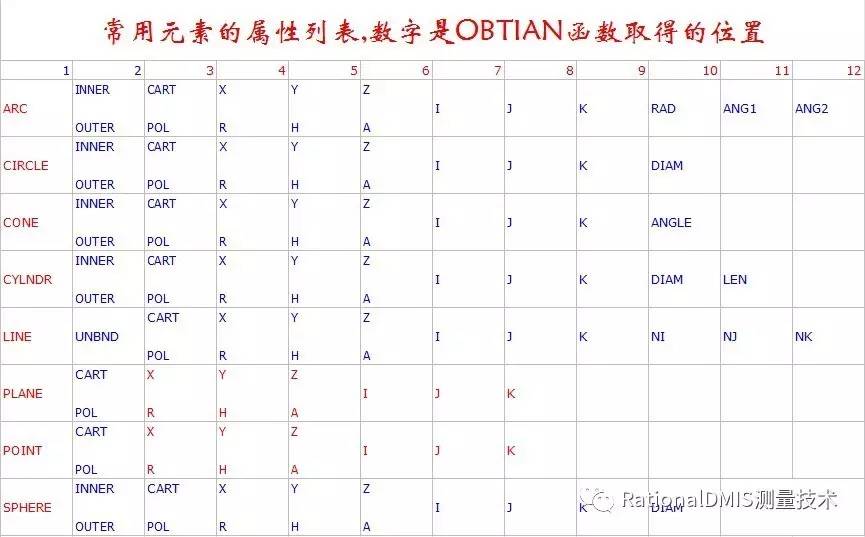
In this example we are getting the measured X value from a feature calledFACE1_PNT1and putting it into a variable calledxActual.The number at the end of the example is referred to as the ordinal value and represents the comma delimited location in the output string of the data to be retrieved:
FA(FACE1_PNT1)=FEAT/POINT,CART,2.4435,0.0233,99.987,1,0,0
As the output string above shows, the variable would contain 2.4435.
When using the OBTAIN statement the ordinal value will depend on the type of data you are trying to get:
flatnessResult= OBTAIN/TA(FLT1),2
Whereas the previous example retrieved data directly from a feature, in this example theOBTAINstatement is getting its data from the output which resulted from the use of theFLT1tolerance.
Writing to devices:
Once variables have been assigned they can be written to various devices using theDMIS WRITEstatement:
WRITE/DID(_TERM),Operator: , userName
This example writes some text defining who the operator of the machine is to a predetermined DMIS device for the system terminal. Not all devices are made available automatically and in these cases you will have to use theDEVICEstatement to specify the type of device and in when you are writing to files use the OPEN statement:
DID(dataFile)=DEVICE/STOR,c:\data\part.dat
OPEN/DID(dataFile),DIRECT,OUTPUT,OVERWR
WRITE/DID(dataFile),X=,xval:10:4, Y=,yval:10:4, Z=,zval:10:4
CLOSE/DID(dataFile),KEEP
This example creates a device called dataFile which points to a file called c:\data\part.dat. From this point onward, all operations on the file are carried out using the device name rather than the actual file name. TheOPENstatement opens the device forDIRECT OUTPUTand the minor wordOVERWRtells the system to overwrite any previous files of that name. Once the file has been opened theWRITEstatement is used to send data to the file, in this case I have included field widths and decimal place parameters so the data will be written in space delimited columns. I could have left off the field widths and put commas between each variable to make the data spread sheet friendly. Once the data has been written the file is closed using theCLOSEstatement. Notice theKEEPminor word means that the file will be retained after closing.
Reading from devices:
$$
$$ define input
$$
DID(plane_file)=DEVICE/STOR,C:\DATA\PLN.DAT
$$
$$ declare variables
$$
DECL/LOCAL,CHAR,20,pln_name
DECL/LOCAL,DOUBLE,xvalp,yvalp,zvalp,ivalp,jvalp,kvalp
DECL/LOCAL,DOUBLE,xval1,yval1,zval1,ival1,jval1,kval1
DECL/LOCAL,DOUBLE,xval2,yval2,zval2,ival2,jval2,kval2
DECL/LOCAL,DOUBLE,xval3,yval3,zval3,ival3,jval3,kval3
DECL/LOCAL,DOUBLE,xval4,yval4,zval4,ival4,jval4,kval4
DECL/LOCAL,DOUBLE,xval,yval,zval,ival,jval,kval
$$
$$ open the input file and read data for measurement
$$
OPEN/DID(plane_file),DIRECT,INPUT
$$
$$ read plane data
$$
READ/DID(plane_file),pln_name,xvalp,yvalp,zvalp,ivalp,jvalp,kvalp
$$
$$ read point data
$$
READ/DID(plane_file),xval1,yval1,zval1,ival1,jval1,kval1
READ/DID(plane_file),xval2,yval2,zval2,ival2,jval2,kval2
READ/DID(plane_file),xval3,yval3,zval3,ival3,jval3,kval3
READ/DID(plane_file),xval4,yval4,zval4,ival4,jval4,kval4
$$
$$ close the input file
$$
CLOSE/DID(plane_file),KEEP
$$
$$ measure plane
$$
MODE/AUTO,PROG,MAN
F(pln_name)=FEAT/PLANE,CART,xvalp,yvalp,zvalp,ivalp,jvalp,kvalp
MEAS/PLANE,F(pln_name),4
PTMEAS/CART,xval1,yval1,zval1,ival1,jval1,kval1
PTMEAS/CART,xval2,yval2,zval2,ival2,jval2,kval2
PTMEAS/CART,xval3,yval3,zval3,ival3,jval3,kval3
PTMEAS/CART,xval4,yval4,zval4,ival4,jval4,kval4
ENDMES
$$
This example uses theOPENstatement inDIRECT INPUTmode so that we can use theREADstatement to read data from a file and use it to measurePLANE.
Program execution:
Programs generally execute sequentially from start to finish unless you use high level to alter that course. The DMIS statementsIF, ELSE or ENDIFare quite often used to alter the route a program will take:
RES_PF=OBTAIN/TA(CIRC1),3
$$
IF/ (RES_PF.EQ.‘INTOL’)
$$
WRITE/DID(_TERM),’RESULT PASSED’
$$
ELSE
$$ WRITE/DID(_TERM), ’RESULT FAILED’
$$
ENDIF
In this example a tolerance calledCIR1is used in an output statement and theOBTAINcommand is used to retrieve the result status. TheIF, ELSE and ENDIFstatements form a block whose first part (between theIFand theELSEstatements) contain code which will be executed if the expression in theIFstatement is true (in this case we write a pass message to the terminal). Notice the use of the.EQ.minor word which means equal to. When the result of the expression is false the second part of the IF ENDIF block is executed (in this case we write a fail message to the terminal).
Another use of the IF ENDIF block is program jumps:
$$
$$ define variables
$$
DECL/LOCAL,INTGR, HOLENUM, NUMHOLES
DECL/LOCAL,DOUBLE, CANGLE, HANGLE
DECL/LOCAL, CHAR, 512, HOLENAME
$$
$$ define variables
$$
HOLENUM=ASSIGN/1
NUMHOLES=ASSIGN/10
HANGLE=ASSIGN/(360/NUMHOLES)
CANGLE=ASSIGN/0
$$
(LOOP)
$$
$$ build a hole name using the loop counter
$$
HOLENAME=ASSIGN/CONCAT (BPHOLE, HOLENUM)
$$
$$ measure a hole (name is variable not constant)
$$
MODE/AUTO,PROG,MAN
F(HOLENAME)=FEAT/CIRCLE,INNER,POL,42.5,CANGLE,0,0,0,1,5
MEAS/CIRCLE,F(HOLENAME),6
ENDMES
OUTPUT/FA(HOLENAME),TA(RAD1),TA(ANG1),TA(DIAM_1)
$$
$$ increment the loop counter
$$
HOLENUM=ASSIGN/HOLENUM+1
$$
$$ check how many holes have been measured
$$
IF/(HOLENUM.LE.NUMHOLES)
CANGLE=ASSIGN/CANGLE+HANGLE
JUMPTO/(LOOP)
ENDIF
$$
This example builds on the concepts we have already introduced. The purpose of the code is to measure 10 holes on a bolt circle using the IF ENDIF block to increment the angle of the next hole and move the program back to the start of the code using theJUMPTOstatement. When this code is reached the execution point for the program is moved to the specified label(LOOP). Notice that we use theCONCATstatement to increment the feature name and the variables for the name and angle are embedded directly in the feature definition.
Although this is a common use of theIFstatement a better solution would be to use aDOloop which would encapsulate all of the code and does not rely on the use of aJUMPTOstatement. Although jumps are allowed in DMIS they are generally considered bad programming practice and should be used with caution.
A typical DO loop would look like this:
DECL/LOCAL,INTGR,LP_CNT
DO/LP_CNT,1,5
$$
$$ program here
$$
ENDDO
This example repeats the code between theDOstatement and theENDDOstatements 5 times starting at 1. TheINTGRvariableLP_CNTis incremented each time the code is executed. We could have put the previous code into this block and used theLP_CNTas the feature number without using aJUMPTO. The only time this becomes difficult is if the code to be embedded is very large making the start and end of the loop hard to see.
This article is designed to get you started with DMIS high level but the DMIS statements listed are just a subset of those available and you are encouraged to explore the full set by purchasing the DMIS Standard. More information and examples can also be found in my book‘Step by Step DMIS Programming’.
共有条评论 网友评论